Food ordering is becoming increasingly digital across restaurants, quick-service restaurants (QSRs), food courts, cafeterias, hotels, airports, and other high-traffic locations. Customers want to browse menus, customize meals, check prices, and place orders quickly without waiting in long queues. An interactive information kiosk can help businesses create a faster and more convenient self-service ordering experience. Using a touchscreen, customers can explore the menu, choose items, customize their orders, pay, and get an order confirmation. For businesses, the kiosks relieve congestion at ordering stations and make the consumers’ journey more efficient. This paper examines how interactive kiosks work in food ordering and what important factors companies should take into account when selecting an interactive kiosk developer.
What Is an Interactive Information Kiosk for Food Ordering?
An interactive information kiosk for food ordering is a touchscreen-based self-service system that allows customers to browse a digital menu and place food orders without depending entirely on counter staff. This is one of the main reasons behind th businesses choosing an interactive kiosk development company for kiosk development. Instead of waiting for an employee to take an order, customers can interact directly with the kiosk. They can view food categories, check product details, select items, customize their meals, review the order, and complete payment when the system supports integrated payments. For example, a customer at a food outlet can order food items, make combinations of meals, add toppings to the meal, and order drinks from the automated counter. It shares information such as pictures of the menu items, details about their nutrition, and deals being offered by the restaurant, or any other helpful information important to the customer. This technology goes beyond being an electronic menu, but proves to offer a platform where one can order food independently while processing a payment.
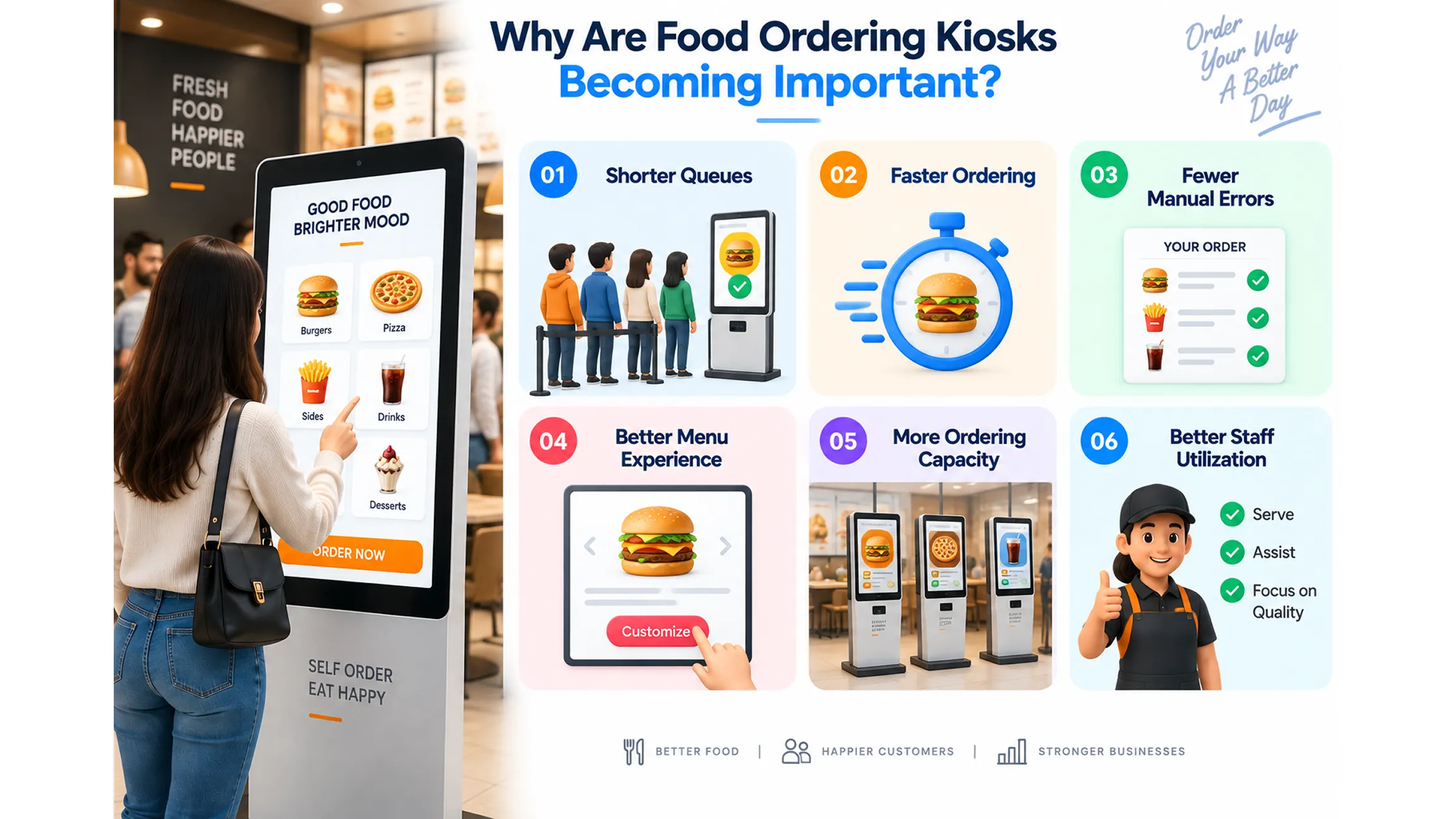
Why Are Food Ordering Kiosks Becoming Important?
Food businesses often face several operational challenges during peak hours. Long queues, order-taking errors, limited staff availability, and slow ordering processes can affect customer satisfaction. Self-service kiosks developed by interactive kiosk companies can provide another ordering channel alongside traditional counters and mobile or online ordering.
Shorter Queues
Self-service ordering enables customers to place their orders at the kiosk rather than waiting for a cashier.
Faster Ordering
A nicely designed interface can help clients navigate menus and the ordering process.
Fewer Manual Errors
By allowing customers to enter their orders directly into the kiosk, the possibility of making mistakes during the ordering phase is lowered.
Better Menu Experience
Digital displays can show customers images, descriptions, customization choices, and offers that may not be included in a regular printed menu.
More Ordering Capacity
Restaurants can install several kiosks on their premises to handle high volumes of orders.
Better Staff Utilization
With the help of kiosks, the staff will have more time for order preparation, client assistance, and performance of all tasks that need human intervention
Key Features of an Interactive Food Ordering Kiosk
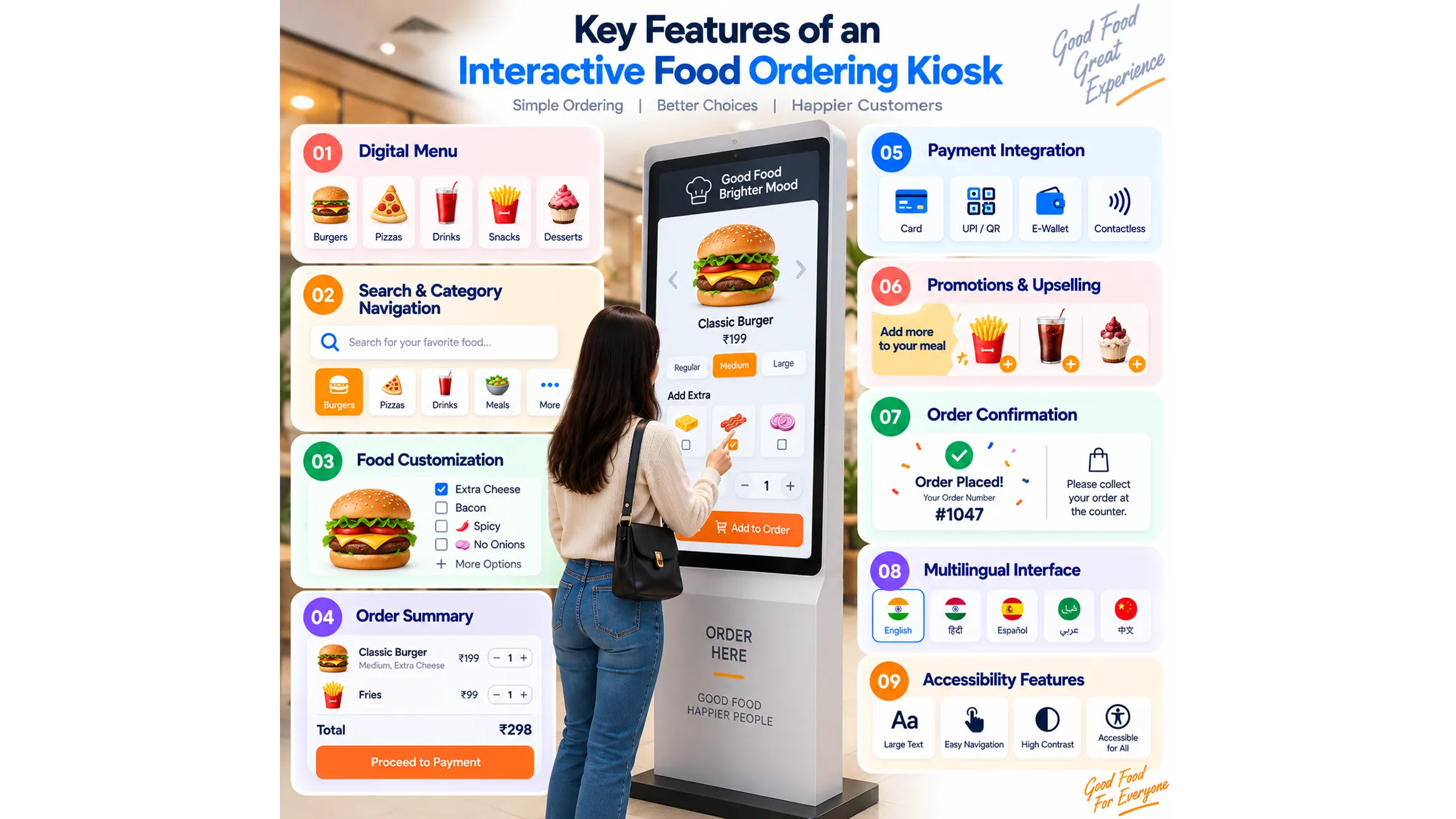
A successful kiosk should make ordering simple for customers while giving businesses the flexibility to manage their menus and operations. Some of the features mentioned below were provided by interactive kiosk companies while developing the kiosks.
1. Digital Menu
A digital menu helps businesses create categories of their food offerings. Such categories can feature any food item, like burgers, pizzas, drinks, desserts, meals, snacks, etc. A digital menu also gives visitors a better visual perception of the food they want to order.
2. Search and Category Navigation
Customers should be able to find their favorite dish via category, search option, or filter. Particularly, easy navigation is important for restaurants with extensive menus.
3. Food Customization
Customers may want to modify their orders by adding or removing ingredients.
The kiosk can provide options such as:
- Extra toppings
- Size selection
- Spice level
- Add-ons
- Meal combinations
- Ingredient removal
- Beverage selection
4. Order Summary
Before payment, customers should have the possibility to see a full overview of their order. The overview can include different items ordered, number of units, adjustments, taxes, discounts, and total.
5. Payment Integration
A food ordering kiosk can be integrated with payment systems to give customers an option to pay for their purchases. Depending on the type of business and hardware, the payment options may include cards, e-wallets, QR payments, etc.
6. Promotions and Upselling
The kiosk can offer extra items on top of what customers are ordering already. For example, if a customer picks a burger, the system may offer fries, drinks, and desserts.
7. Order Confirmation
After finishing the order, the kiosk can provide order confirmation details with the order number. This ensures the customers know what the next step is, such as waiting for the order to pick up or going to the pickup location.
8. Multilingual Interface
Restaurants with customers from different regions can provide multiple languages to facilitate ordering for a larger audience.
9. Accessibility Features
Large buttons, good font, clear navigation, good contrast, and basic instructions make it easier for different people to operate the kiosk.
How Interactive Kiosk Development Works
Professional interactive kiosk development involves more than creating a touchscreen interface. The software, hardware, payment system, restaurant workflow, and backend systems need to work together.
Step 1: Requirement Analysis
The development team should first understand the restaurant’s menu, ordering method, customer structure, kiosk placement, payment details, and business goals. Abhiwan Technology begins the process of developing a kiosk by doing requirement analysis and audience understanding and establishing business goals.
Step 2: UI/UX Design
The ordering interface must be simple. The clients should be able to move from menu selection to payment without any issues.
Step 3: Kiosk Software Development
The development team compiles the necessary components in this phase, such as menu management, product customization, ordering system, and payment integration.
Step 4: Integration
The kiosk should also be compatible with POS systems, restaurant management software, payment gateways, cloud services, inventory systems, kitchen display systems, or CRM software. What synchronization is needed depends on the current technology stack of the restaurant.
Step 5: Testing
Kiosks in restaurants process hundreds of interactions daily, therefore the testing has to include touchscreen responsiveness, software performance, payment procedures, as well as functionality of the menu and hardware compatibility.
Step 6: Deployment
After testing, the kiosk software is configured for the selected hardware and deployed at the required restaurant or food service locations.
Step 7: Maintenance and Support
Menus, prices, offers, products, and integrations may change over time. Regular updates and technical support help keep the kiosk functional and accurate.
Benefits of Choosing Custom Interactive Kiosk Development
Businesses can choose ready-made kiosk solutions, but custom interactive kiosk development provides more flexibility when a restaurant has specific requirements.
Customized Ordering Experience
The design of the system can follow the restaurant's brand identity, menu layout, customer journey, and ordering patterns.
Flexible Integrations
A customized solution can be built that can interface with any necessary company infrastructure and APIs.
Scalable Architecture
Companies can begin with just a few kiosks and add more as the system grows.
Better Brand Experience
Custom animations, visuals, product photos, and marketing content can make the ordering process seamless with the restaurant brand.
Business-Specific Features
Businesses can include functionalities such as customer loyalty schemes, special offers, feedback, order tracking, and suggestions based on their needs.
Why Choose Abhiwan Technology for Food Ordering Kiosk Development?
Making the right choice of an interactive kiosk development company is critical because the kiosk will play an essential role in the entire process of ordering for customers. Abhiwan Technology offers customized interactive kiosks for retail, food service businesses, malls, events, promotions, etc. The interactive kiosks developed by the company are designed to help customers place orders by browsing through menus, customizing orders, and processing them on their own with the help of the modern touchscreen technology. The process involves identifying the customer's requirements, UI/UX design, development, testing, deployment, and post-launch support.
The company also provides kiosk solutions for:
- Retail experiences
- Product discovery
- Mall navigation
- Self-service ordering
- Brand activation
- Interactive advertising
- Events and exhibitions
- Customer feedback
- Promotional campaigns
Abhiwan's kiosk solutions can support Windows, Android, and Linux environments depending on project requirements. The company also supports integrations with CRM, payment systems, and cloud platforms.
For restaurants and food businesses, this means the kiosk can be planned as part of the wider digital ordering ecosystem rather than functioning as an isolated screen.
How Food Businesses Can Use Interactive Kiosks
Food ordering is only one possible application. Businesses can use an interactive information kiosk throughout the customer journey.
Quick-Service Restaurants
Fast-food chains can install kiosks during peak times to manage large workloads.
Food Courts
Food courts can utilize kiosks to provide digital menus and place orders at either dedicated restaurants or the central premises.
Cafeterias
Cafeterias can use the kiosks for fast ordering, especially in peak hours of the day.
Hotels
Hotels can install kiosks for ordering food, room service, discovering restaurants, etc.
Airports and Transportation Hubs
High-traffic locations can take advantage of self-service kiosks to order food items without waiting long in a queue.
Hospitals
Hospitals and healthcare facilities can use kiosks for cafeteria ordering while maintaining a separate digital ordering channel.
Interactive Information Kiosk vs Traditional Food Ordering
| Feature | Traditional Counter | Interactive Information Kiosk |
|---|---|---|
| Menu browsing | Staff or printed menu | Digital menu |
| Order placement | Staff-assisted | Self-service |
| Customization | Verbal | On-screen |
| Product images | Limited | Digital images/videos |
| Promotions | Staff communication | Dynamic display |
| Upselling | Staff-dependent | Digital recommendations |
| Payment | Counter-based | Can be integrated |
| Order confirmation | Staff/receipt | Digital confirmation |
| Scalability | Requires more staff | Add additional kiosks |
| Data opportunities | Limited | Can support analytics |
The kiosk does not necessarily need to replace the traditional counter. It can work as an additional ordering channel for customers who prefer self-service.
How Much Does Interactive Information Kiosk Development Cost?
The cost of developing an interactive information kiosk for food ordering depends on the project's features and technical requirements. A basic kiosk with a digital menu and simple ordering functionality will have different development requirements from a system with advanced customization, payment integration, POS connectivity, loyalty programs, analytics, and multiple locations.
Major cost factors include:
- Kiosk hardware
- Number of kiosks
- UI/UX design
- Menu complexity
- Food customization features
- Payment integration
- POS integration
- Inventory integration
- Kitchen display integration
- Backend development
- Analytics
- Loyalty features
- Multi-language support
- Maintenance and support
Businesses should define their required features and integrations before requesting a project estimate.
Conclusion
Customers increasingly expect convenient and faster ways to order food, particularly in busy restaurants, QSRs, food courts, cafeterias, and other high-traffic environments. An interactive information kiosk can provide a self-service ordering experience where customers browse menus, customize products, review orders, access promotions, and complete transactions. A well-designed kiosk can help businesses increase their sales, relieve pressure from the service desks, and start another form of interaction with customers. The successful use of a kiosk depends on the choice of technology, hardware components, integration solutions, and customer experience. An experienced company in the field of interactive kiosks like Abhiwan Technology can assist a company in the development and implementation of a particular kiosk solution suited to its unique ordering process.
Written By Vaibhav Karanwal