A game design document (GDD) is a living document that describes the game, how it plays, and how it is made. It is the single place where designers, artists, programmers, testers, and producers can go to see what the team has decided to make.
Without a GDD, people fill in the spaces with their own assumptions. One person imagines a fast action game, another a slow tactical game, and this difference only becomes apparent once the work is underway. In this guide, you'll learn what a GDD is, why it matters for game development planning, what to include, and how to keep it useful, plus a downloadable template.
Definition of a Game Design Document
A game design document is a sort of roadmap for the entire project. It typically includes information on the concept, target audiences, gameplay mechanics, features, levels, interface, artistic vision, technical specifications, monetisation, and milestones. It is not a business plan, and it is not a marketing presentation.
Think of a GDD more like a living document than a contract cut in stone. Game studio Game-Ace also treats a GDD as a living document, and most studios agree: it changes as you test; so the design document has to change with it. Many confuse the GDD with the following documents; here's how they are different.
| Document | Audience | Purpose |
|---|---|---|
| One-pager | Team and quick outside intros | Summarise the concept and hook on one page |
| Pitch deck | Investors and publishers | Sell the idea and the team |
| Game design document | Designers, artists, QA, producers | Guide production of the full game |
| Technical design document | Engineers and tech leads | Define architecture, systems, and tools |
On small projects, the GDD and the technical document may be contained in the same workspace. On larger projects, the tech lead has their own technical document.
Why You Should Care About the GDD in Game Development
A GDD is an essential part of professional game development services, as it helps teams plan, organize, and manage the game production process. It offers four practical benefits.
- It helps us stay on the same page. When there's a new person on the team, they can read this and jump right into working without having to go to the producer and ask, " What is this game again?
- It improves estimation. You cannot estimate what you have not defined. Since a well-defined GDD enables you to enumerate features, levels, and assets, you get fed directly into budget and schedule.
- It accelerates decision-making. The document saves team members from having to search for answers; if you have a question, you can simply consult the document. If the answer is not there,e you can agree once and learn it.
- It enables third-party collaborators. In the case of an external studio, the GDD is the core of the project brief. A well-defined GDD will shave down the scoping phase and decrease change requests.
The Way GDDs End Ambiguity and Alteration of Scope
The majority of scope issues begin as ambiguous statements. "The player can upgrade their weapons." Sounds straightforward until three people read it three different ways. How many weapons? How many upgrades to each? Does the appearance change? Are they bought? Found? Created? Each answer alters the amount of work.
A good GDD replaces vague lines with precise ones. Take a look at these two versions.
- Vague: The player can craft items.
- Specific: The player can craft 12 items from 8 materials at one workbench. Each recipe needs two or three materials. Crafting takes five seconds and cannot be cancelled. Recipes unlock at levels 3, 6, and 9.
The second version can be estimated, implemented, and tested. It also provides QA with something to compare with, so a notion of "done" can be established.
The scope is also managed by the GDD in three other ways:
- This is what is in and out. A must-have, should-have, and nice-to-have split shows what is dispensable if time is tight.
- It produces a change process. You can see what will be impacted if someone suggests a new feature and make an informed decision.
- It makes decisions. Having it agreed to and written down, it is less likely to be the same thing raised the following month.
Scope will still move, because the game will change. The difference is that we want to make the change visible and deliberate, rather than accidental.
Game Design Document Template: What to Include
Where particular sections go will vary depending on the type and scale of the game. Most GDDs include the following core sections, which help organize the game development process. Here is a handy game design document template with a reminder of what each section should answer.
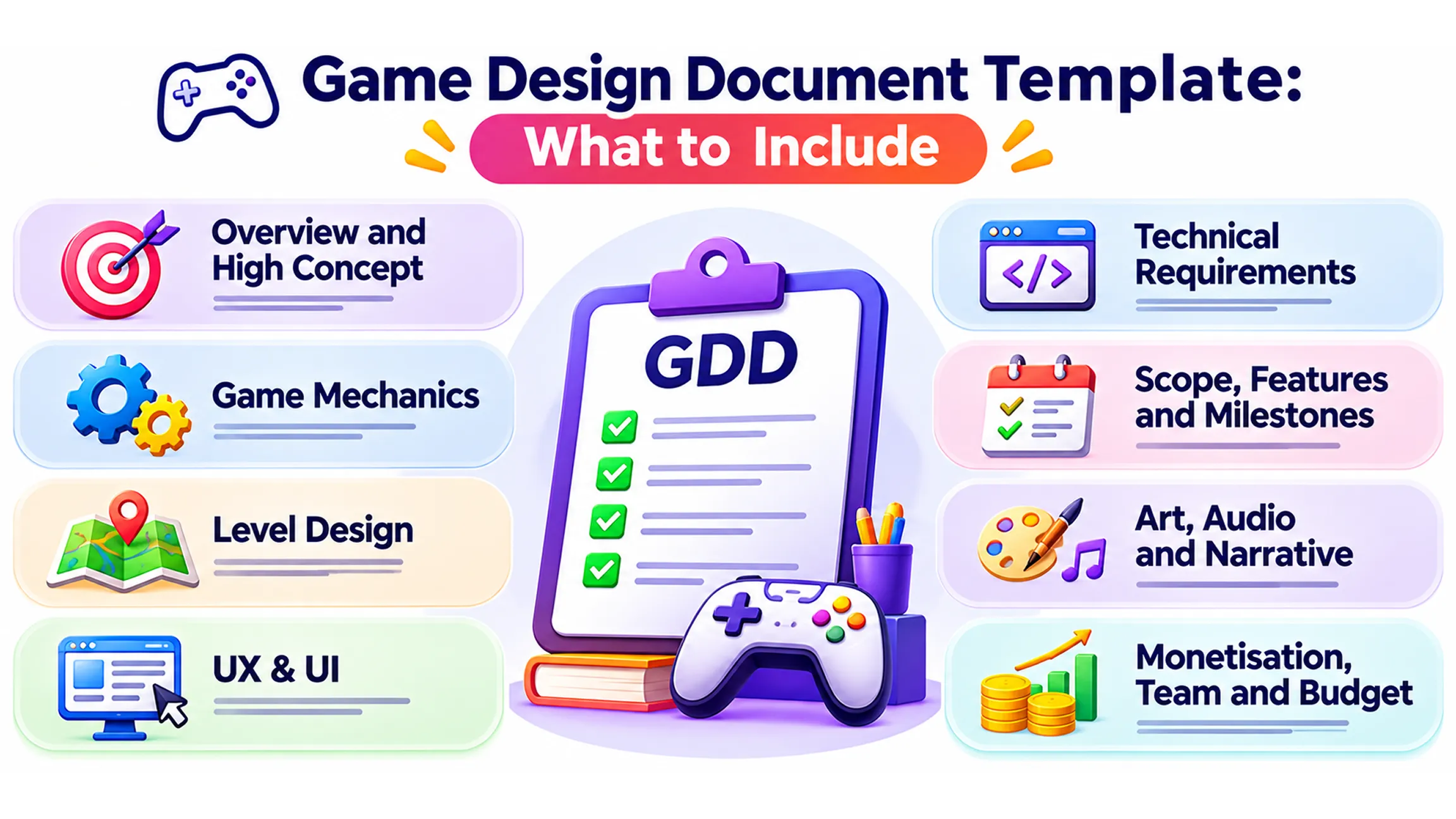
Overview and High Concept
Begin with a one-sentence summary of the game: title, genre, hardware, intended audience, and a paragraph summary of the pitch. List two or three reference games and describe what makes yours different. Anybody should get an idea of the game within a minute.
Game Mechanics
This is the most important part of the document. List out the ways a player interacts with the game (moving around, fighting, building structures, trading, solving, whatever) and then the rules that stitch those interactions together. Explain the core loop, the gameplay, the reward system, and the progression system.
Translate every mechanic into rules as much as possible, putting in numbers where you can. Explain the interactions between mechanics, for example, how combat impacts the economy, or how crafting impacts inventory; this is where most of the unseen effort lives.
Level Design
Describe the levels or spaces: number of levels, duration of each, difficulty increase, mechanics involved, and the purpose of the level. Simple illustrations, diagrams, or drawings of some representative levels and the rules of the secrets, checkpoints, and rewards systems. In case there are no levels, describe the regions and travel in open worlds.
For instance, consider a level design specification for a puzzle game: a total of 60 levels over five theme worlds with 12 levels each. The first world has matching puzzles only, while the second world introduces blocker puzzles. The time limit set per level is two to three minutes; the level difficulty increases gradually, with an easier level following every fifth level.
UX & UI
Describe the basic flow of the game, what happens during the first time playing, tutorial system, menu systems, HUD, controls and feedback, screen flows and wireframes of the important screens, inputs from different platforms and accessibility features, and so forth. If not included in the tutorial section early, it will be included very late.
This is truly the basic principle of onboarding: player gets first success in 60 seconds, learns one thing at a time, and is able to skip any part of the tutorial, except for the first try. As mentioned above, this rule ensures that the tutorial is not played in the end.
Technical Requirements
For each engine, target platform, minimum requirements for a target device, frame rate and performance targets, networking, backend requirements, save systems, and third-party tools, make note of the risks involved with each element (multiplayer, large worlds). The tech lead should take ownership of this area.
For a mobile game this might be: Unity, latest and last two major releases of iOS & Android, 60 fps on all mid-range phones from last three years, cloud save (one provider, one feature), a maximum download size that we will agree on before production kicks off.
Scope, Features and Milestones
Rank each feature as a must-have, should-have or nice-to-have and identify what will be included in the first playable version, launch and subsequent updates. Make notes of intervals such as prototypes, vertical slices, alpha and beta, and what completes a piece for each. This section links the design to the schedule.
Art, Audio and Narrative
Provide a visual style and reference images, character and environment list, list the animation requirements, musical needs and sound direction, plus a brief story summary (if your game has one). Concept art says so much more than pages of long text.
Monetisation, Team and Budget
Describe how the game is monetised. Is it premium, free-to-play, or other? Include the team structure and their responsibilities, highlight the key people, and give an overview of the budget. Some teams have a separate document for the budget, but as long as it is linked from the GDD, it is ok.
An Easy GDD Template You Can Use
This is your starting skeleton; delete what is not needed.
- Summary: title, genre, platforms, target, pitch, references.
- Core loop and pillars: three to five core principles that inform design.
- Mechanics and systems: what they do, what's included, how they evolve, economy.
- Gaming mechanics: level or world design, pacing, and progression curve.
- UX and interface: onboarding, screen flows, controls, accessibility.
- Art direction: style guide, asset list, references.
- Audio: music, effects, voice.
- Narrative and characters, if relevant.
- Technical requirements: engine, platforms, performance, backend.
- Scope and feature list: such as essential, expected, desired.
- Milestones and schedule.
- Monetisation, risks, and open questions.
- Change log: date, author, and what changed.
Sample: One Page GDD (Game Design Document) for a Small Puzzle Game
To demonstrate how brief a good GDD is, here's a one-page GDD for a hypothetical mobile puzzle game:
- Idea: a tile-matching puzzle game designed for commuters to play with one hand in short bursts.
- Main mechanic: tap on tiles, complete the goal, collect stars, move to the next level.
- Mechanics: match three, combo bonus after four matches, three boosters, and a limited number of moves per level.
- Number of levels: 60 levels with five worlds; each world takes two or three minutes.
- UX: one-handed play. The first win in less than a minute. Large touch targets.
- Technical: Unity, iOS and Android, 60 FPS on mid-range phones, cloud save.
- Scope: must-have: core matching, 60 levels; should-have: daily reward; nice-to-have: leaderboards.
- Milestones: prototype in four weeks, first playable in ten and launched in about five months.
How Detailed Should a GDD Be?
The amount of information that should be documented depends on the number of people in the team, project complexity, and how much of the work is subcontracted. A two-man prototype doesn’t require a hundred-page document, whereas a larger team collaborating with external programmers and artists requires more thorough documentation.
One good way to determine the quality of the GDD is to verify whether an outside person (engineer or artist) can comprehend the project without constantly asking questions of the producer. It should be well-documented concerning the mechanics, systems, work processes, and limitations. Sometimes narrative themes, style, and mood don’t require many words since visuals can convey this information better than anything else.
Frequent, repetitive questions from team members during standups might indicate that the GDD needs additional detail.
How to Turn a Game Design Document into a Production Plan
The game design document describes what the team will build, but the leap to project management is to turn those decisions into tasks that can be prioritized, assigned, and tracked. Your GDD becomes far more useful when its features are related to the production process. This connects the design to production and keeps the team focused.
Break down major features into smaller, more manageable tasks. For example, if the GDD is for a game and has a major character development feature, the task might be designing the rules for how the development works, designing the interface, implementing the XP system, balancing how much XP is needed to level up, testing the level-up system, etc.
Now that you've broken down the structure of your system into steps, the next step is to designate ownership over each stage. For example, a designer might establish the flow of your software, a programmer might code it, an artist might build the user interface, and a QA tester might verify its functionality.
Link these various work items to production milestones. A feature doesn't need to be complete in the first playable build. Instead, the first build can establish the core mechanics, with visually oriented polish and lock-down occurring at future milestones. This helps teams prioritize the work that's most critical.
Here is a simple production planning table to help you:
| Feature | Production tasks | Owner | Target milestone |
|---|---|---|---|
| Character movement | Controls, animations, collision testing | Programmer and animator | Prototype |
| Combat system | Attack rules, damage logic, enemy response | Designer and programmer | First playable |
| Level design | Layouts, obstacles, checkpoints, rewards | Level designer | Vertical slice |
| User interface | HUD, menus, settings, feedback | UI/UX designer | Alpha |
| Bug testing | Functional testing, balancing, issue tracking | QA team | Alpha and beta |
Lastly, inspect the production plan periodically. When a feature requires more time to implement than planned, verify if the specification was vague, the technical implementation is much more sophisticated, or the scope of that feature grew. Document changes under review in the GDD and adjust the corresponding tasks and dates.
The GDD and production plan should complement each other. The GDD describes the game that you want; the production plan shows how you are going to get there. When they both align, then planning a game is much easier, and everyone has a better understanding of their progress, tasks, and the priority of tasks.
GDD Remains Alive
A GDD that no one updates is fiction. Some habits that will keep it alive:
- Owners for each section. Mechanics: the tech lead; scope and milestones: the producer.
- Update in this same sprint with the change. Don't postpone this for a later cleanup.
- Maintain a change log. Include date, author, and reason for any major change.
- Check it at checkpoints. Stop the slip before it slides.
- Freeze at levels. Freeze high-level scope (content, platforms, core loop) early. Freeze systems at end of pre-prod. Keep tuning and content values in the air until as late as possible.
And everything after the freeze can be signed off easily; a person with sight of the schedule can check and sign 'yes' or 'no'.
Tools for Writing a GDD
The medium is less important than the process, but these are typical options: Notion and Confluence for collaborative pages with access controls; Google Docs for early drafts or simple docs; Miro for diagrams of system structure and roadmaps. For engineering-heavy projects, some teams keep the GDD in Markdown in a git repo. Use whatever everyone can read and update easily, even outside collaborators.
GDD Mistakes to Avoid
- Commissioned it, never come back to it. It has diverged from the game.
- Too many words, not enough details. Numbers, tables, and diagrams are preferable to paragraphs.
- Concealing the extent. If none of your priorities are flagged, the entire project will be constructed at the same level of detail.
- Omitting technical specifications. System and performance limits can change the design.
- Reusing a template without modification. A slot game requires maths models, an MMORPG needs server details, and a hyper-casual game needs good onboarding and monetisation sections.
- If all the work is owned, no one owns it.
Using a GDD with a Development Partner
The GDD you provide to an external team is the most comprehensive briefing that they can get. Even a sketchy one can help the studio avoid reinventing the wheel or guesswork, and identify holes to keep your project on the rails. An external game development services provider can even help to write or review the GDD at the pre-production stage to ensure that it's prepped for production when the build kicks off.
Conclusion
A game design document will not make a game good, but it clarifies the project. It translates the nebulous ideas into clear rules, defines in- and out-of-scope, and provides a common source of information for the team. Make it concrete, keep it updated, use it to plan, estimate, test, and brief partners. Start small and let the document grow with the game.
Written By Vaibhav Karanwal